Friday, 25 March 2016

Restore Files Using Recuva

Recuva (pronounced "recover") is a freeware Windows utility to restore files that have been accidentally deleted from your computer. This includes files emptied from the Recycle bin as well as images and other files that have been deleted by user error from digital camera memory cards or MP3 players. It will even bring back files that have been deleted from your iPod, or by bugs, crashes and viruses!


Features:

  • Simple to use interface - just click 'Scan' and choose the files you want to recover
  • Easy to use filter for results based on file name/type
  • Simple Windows like interface with List and Tree view
  • Can be run from a USB thumb drive
  • Restores all types of files, office documents, images, video, music, email, anything.
  • Supports FAT12, FAT16, FAT32, exFAT, NTFS, NTFS5 , NTFS + EFS file systems
  • Restores files from removable media (SmartMedia, Secure Digital, MemoryStick, Digital cameras, Floppy disks, Jaz Disks, Sony Memory Sticks, Compact Flash cards, Smart Media Cards, Secure Digital Cards, etc.)
  • Restores files from external ZIP drives , Firewire and USB Hard drives
  • It's fast, tiny and takes seconds to run!

TeamViewer

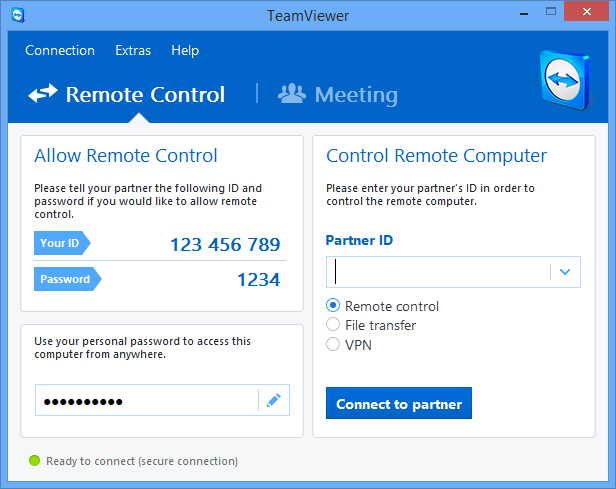
TeamViewer is the All-In-One Solution for Remote Access and Support over the Internet.


TeamViewer connects to any PC or server around the world within a few seconds. You can remote control your partner's PC as if you were sitting right in front of it.
Features:
  • control computers remotely via the internet,
  • record your session and covert it to AVI,
  • online meetings,
  • Drag & Drop files,
  • Multi-Monitor support.

  Remote control / Support

Instant remote support – no need for any installation on the client sideRemote maintenance – 24/7 access to remote computers and serversRemote access – access your data and applications – anytime, anywhereHome office – access your office computer from home
Meetings / Presentations
Online meetings – have up to 25 participantsPresentations – boost your sales potentialTraining session – cut costs by conducting training onlineTeam work – collaborate online on documents in real-time

Advanced IP Scanner


Advanced IP Scanner is a reliable network scanner to analyse LAN. The app scans all network devices, gives you access to shared folders and FTP servers, provides remote control of computers (via RDP and Radmin) and can even remotely switch computers off.


Features include:
  • Fast network scanning.
  • MAC addresses detection.
  • Remote access.
  • Remote Wake-On-LAN.
  • Easy access to shared folders and FTP servers.
  • Remote control via RDP and Radmin.

Overall, Advanced IP Scanner is a fast, robust and easy to use IP scanner. It can locate all the computers on your network and provides easy access to their various resources, whether HTTP, HTTPS, FTP or shared folders. The app has been designed with a simple and intuitive interface that can be navigated by users of all levels of expertise.

Technitium MAC Address Changer

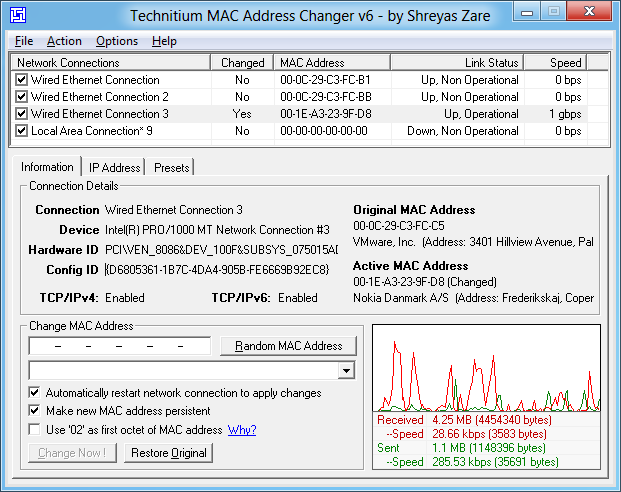
Technitium MAC Address Changer Screen Shot

Technitium MAC Address Changer allows you to change (spoof) Media Access Control (MAC) Address of your Network Interface Card (NIC) instantly. It has a very simple user interface and provides ample information regarding each NIC in the machine. Every NIC has a MAC address hard coded in its circuit by the manufacturer. This hard coded MAC address is used by windows drivers to access Ethernet Network (LAN). This tool can set a new MAC address to your NIC, bypassing the original hard coded MAC address. Technitium MAC Address Changer is a must tool in every security professionals tool box.

Features
1)Works on Windows 10, 8 & 7 for both 32-bit and 64-bit.
2)Enhanced network configuration presets with IPv6 support allow you to quickly switch between network configurations.
3)Allows complete configuration of any network adapter.
4)Command line options with entire software functionality available. You can select a preset from specified preset file to apply directly.
5)Update network card vendors list feature allows you to download latest vendor data (OUI) from IEEE.org.

How Does It Work?

This software just writes a value into the windows registry. When the Network Adapter Device is enabled, windows searches for the registry value 'NetworkAddress' in the key HKEY_LOCAL_MACHINE\SYSTEM\CurrentControlSet\Control\Class\{4D36E972-E325-11CE-BFC1- 08002bE10318}\[ID of NIC e.g. 0001]. If a value is present, windows will use it as MAC address, if not, windows will use the hard coded manufacturer provided MAC address. Some Network Adapter drivers have this facility built-in. It can be found in the Advance settings tab in the Network Adapter's Device properties in Windows Device Manager.

How To Change MAC Address

1)Starting MAC address changer will list all available network adapters.

2)Select the adapter you want to change the MAC address. You will get the details of your selection below.

3)In the Information tab, find the Change MAC Address frame. Enter new MAC address in the field and click Change Now! button. You may even click Random MAC Address button to fill up a randomly selected MAC address from the vendor list available.

4)To restore the original MAC address of the network adapter, select the adapter, click Restore Original button in the Change MAC Address frame.
NOTE: This tool cannot change MAC address of Microsoft Network Bridge. Network Bridge will automatically use the original MAC address of the first NIC added into bridge with the first octet of MAC address set to 0x02.

TubeMate YouTube Downloader

TubeMate - The fastest and most famous YouTube downloader]


Visit http://tubemate.net to get more information

[The original fast download technology]

* Fast download mode(with multiple connections for a download)

* Multiple download resolution options

* Background, multi-download

* Resume downloading

* Convert to MP3 (powered by MP3 Media Converter)

* Playlist as video/audio(powered by Meridian Player)

* Share your video finds via Google Buzz, Twitter or e-mail at the tap of a button

* YouTube search and related videos suggestions

* Save favorite videos to your YouTube account, create playlists


TubeMate YouTube Downloader enables you to quickly access, search, share, and download YouTube videos.
Because downloading always happens in the background, you can go on watching YouTube, surfing the Internet, tweeting, and listening to your music as you download.


[Available resolutions]

1920x1080(Full-HD): GalaxyTab, Galaxy S2, PC

1280x720(HD): high-end devices

640x360: general devices

320x240: low-end devices

640x360, 854x480(FLV) : Android 2.1 and over

(the available options depend on the quality of the uploaded video and your device)


Terms Of Use : TubeMate must only be used for private purposes. Any commercial use of TubeMate is strictly forbidden and will be pursued in a court of law.


YTmulti - Watch Multiple YouTube Videos Easily

=>YTmulti instantly creates a playlist of videos that have been split on YouTube. Usually, when one part finishes, you have to click on the next part. Instead, YTmulti brings back each part automatically and plays them back one after the other without you having to do anything. Simply paste the first part of a multiple-part video and it'll do the rest.

=>For example, this (http://www.youtube.com/watch?v=ct2kbLBuSOg) has three parts, so the link can be pasted and the remaining two parts are brought back.

=>Alternatively, you can just add the word 'multi' after 'YouTube' in the url, like this:
http://www.youtubemulti.com/watch?v=ct2kbLBuSOg
 
=>This makes it easier when you're watching the video on YouTube and you want to jump straight to YTmulti. You can also share the playlist easily with one link so other people can watch the entire thing in one go.

=>The main advantage to this is that you don't have to sign-in to your YouTube account (if you have one) and you don't have to manually find each part and add them to your playlist individually.

Android Marshmallow:new features

Google releases a slightly improved version of Android every year, but this time around it's pulled out all the stops. Android Marshmallow is the latest version of Android, and includes brand-new features that make using your smartphone even better. Features such as the battery-saving Doze mode and the highly intelligent Google Now on Tap represent a step forward - and overall Marshmallow is the biggest update to Google's mobile OS in ages. Still not sure if you should upgrade? Here are 14 reasons we think Marshmallow is the best version of Android yet.

1. USB Type-C
Nexus 6P review: USB Type-C makes an appearance on the bottom edge of the phone

USB Type-C represents the holy grail of connections. It’s silly-fast, can be used any way up – and it’s going to be the most commonly used connection in the next few years. What’s more, it also allow for much faster charging than conventional cables: it can fully charge a Nexus 6P in around two hours.
As you’d expect, Android Marshmallow is futureproofed with built-in USB Type-C support, so as long as your smartphone has the connection, Marshmallow can take advantage of it.

2. Now on Tap

One of the biggest changes to Android Marshmallow comes in the form of Google Now. Although it may look the same as before, Google Now is now pre-baked into every area of the OS, and it’s cleverer than ever. Google Now’s focus is now on “context”, and that means the digital assistant will be better at understanding where you are, and what you’ll need to know as a result.

3. Adopted Storage

Most Android phones allow you to insert some form of memory card, but previous versions of Android always treated it as a separate entity. While that’s great if you want to swap memory cards around – it can be annoying if you want to use the memory card as a permanent storage solution. That’s where Adopted Storage comes in. Rather than treating the memory card as a separate storage space, Marshmallow can treat it like the rest of the memory on your phone. The result? You can use your memory card space without any fuss.  

4. Android Pay

Much like Apple Pay, Android Pay allows users to store credit and debit card information on their smartphones, and then wirelessly pay for goods and services quickly and securely. To make it more secure, Android Pay uses a virtual account number instead of your own, and also keeps a detailed history of purchases made using the app.
If you’re unlucky enough to lose your phone, Google has you covered. Android Device Manager makes it easy to remotely lock and wipe your Android device in the event of loss or theft.
The only catch? Android Pay has been in the US since late September, but we still don’t know when it’s coming to the UK.
5. System UI Tuner
Marshmallow fixes one of our biggest pet peeves with the Android operating system. Google’s mobile OS uses the status bar at the top of your screen for key information about reception, battery life and more – but it can get crowded and scruffy at times.
With the System UI Tuner, users can now add their battery percentage to the system tray, and choose which other things they want to be displayed there. The result? Your Android phone will only show the information you want to see.

6. Improved Copy and Pasting

Although it seems like a relatively simple task, previous versions of Android made cutting and pasting text a fiddly, frustrating affair. Before, Google’s OS forced you to go to the top of the screen to cut, copy and paste – but Marshmallow lets you hover just above the selected text. If that sounds familiar, that’s because it’s exactly what iOS already does – but we’ll forgive Google as it’s a vast improvement over its original solution.

7. Custom Google tabs


Best Android Marshmallow features

Google Chrome is one of the best mobile browsers around, and Marshmallow makes it easier for developers to integrate into their own, third-party apps. That means you don’t have to switch applications when you need to browse the web, and it also means that when you are let loose on Google's browsers, all of your passwords and logins are stored and ready to go. The result? The whole browsing experience is much more seamless.

8. Clear permissions system

Although not one of the most glitzy features, Marshmallow’s app permissions overhaul will have an immediate effect on how you use your phone. Previous versions of Android forced the user to configure app settings at the point of install, making downloading apps an overly complex, drawn-out process.
Instead, Marshmallow only asks for your permission when it needs to. So, rather than configuring something such as Snapchat when you first download it, Android will ask to use your phone’s camera once, and only the first time you use it.
If you want to go back on your original decisions, Marshmallow has you covered. The new OS presents things by permissions rather than apps, so you can quickly see what apps are using your camera, accessing your photos, location data and much more.